




posted 10th August 2026
Three posts nearly went out on my LinkedIn with the caption “6.2 6.3”.
Not a typo. Not a sentence that got cut off. That was the whole caption. Two numbers, sitting there in public, looking for all the world like I’d had some sort of episode at my desk.
Now how did I end up there? Let’s rewind a bit.
The bit I always dreaded
It’s a Tuesday night. The podcast episode is recorded, edited, and cut into shorts. Good ones, the kind I’m genuinely pleased with and keen to share with the world.
And then comes the part I dread.
Download the clip. Write a caption for LinkedIn. Rewrite it for TikTok, because what lands on one, dies on the other. Find five hashtags that aren’t lazy. Upload the clip. Upload on the other platform. Tick all the relevant boxes in one, then the other. And now wait. Now do Instagram. Then do YouTube, which wants a title as well. Then start again with the next short, and one after that and another, and another!
Now let’s keep in mind there are roughly 12–17 shorts that come from each episode.
Three to five hours per episode. Every episode. Not creating anything, just moving it around. Copying, pasting, ticking boxes, and then waiting.
I love making the content. I’ve never loved posting the content. In fact, I’d go as far as to say that I hate it.

So I decided to fix it
Slight issue: I’m not a developer. Never have been. My background is delivery and coaching teams through change, not writing code and wiring up APIs all day.
What I did have was Claude, and a sneaky suspicion that this was exactly the sort of dull, repeatable, rules-based work he should be good at. This was the first time I’d properly used AI agentically, meaning I wasn’t asking it questions and copying answers out. It was doing the work, in the actual tools, while I watched.
Bit of a spoiler if you have not watched it do this; it’s well freaky! Watching my friendly robot chum work away on my screen, clicking away, and making stuff happen. It’s weird and cool at the same time.
Now I’d love to say that this whole process was plain sailing, but in truth, it was not a straight line. It was a mega wiggly one.
The messy middle
Here’s the honest version, because the tidy version helps nobody…… and it would be soooooo boring!
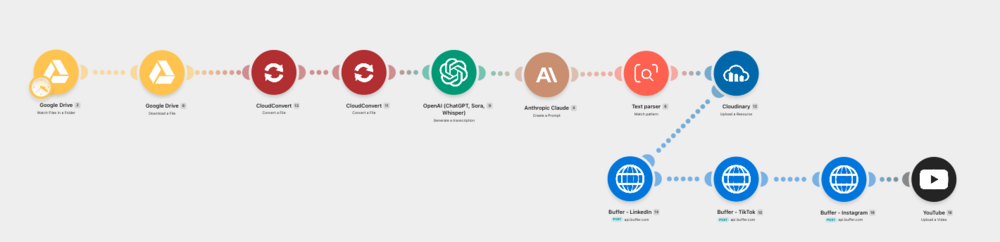
The finished thing works beautifully. A clip lands in a Google Drive folder, and a few minutes later it’s been converted, transcribed by Whisper, written up by Claude into platform-specific captions, hosted on Cloudinary, queued in Buffer for LinkedIn, TikTok and Instagram, and published straight to YouTube. Eleven steps, four platforms, no me. I drop a file in a folder and go and do something useful.
Getting there took a stack of tools (Make, Buffer, Cloudinary, CloudConvert, Whisper) and a lot of doubling back.
Ladies and gentlemen, the greatest hits:
Track 1: Link Preview (really not cool when you want to share a video)
Buffer’s ready-made connector simply wouldn’t attach video properly. Every post would have gone out as a limp little link preview instead of an actual video. The fix was throwing that connector away and building the request to Buffer’s API by hand, which is not a sentence I ever expected to write about myself. And it kind of isn’t, this was where Claude stepped up and I was on standby to do bits and bobs he couldn’t do.
Track 2: 6.2 6.3 (Radio Edit)
You’ve met this one already. A reference in one field was pointing at the wrong thing, so instead of my carefully written caption, three posts published the internal shorthand for it. Nothing flagged it. Nothing went red. As far as the software was concerned, everything had worked perfectly, which is somehow worse.
Track 3: The Field That Decided to Move House
A field (think of a numbered reference point) had quietly attached itself one level higher in the structure than it should have. Looked right on screen, to me and Claude at least…… but it really wasn’t. Same defect, three times over, in three different places. We only found it by running it and reading the wreckage.
And yes, some of the advice I got from Claude along the way was wrong, and confidently wrong at that. Not maliciously, not even unreasonably, but wrong, nonetheless. This is where the old adage of short and meaningful feedback loops really earns its crust. Claude would suggest an approach, we’d build it, and it wouldn’t work. Maybe because a third-party tool had changed something months earlier. Maybe Claude would hallucinate. Maybe I hadn’t explained it half as well as I thought I had. I’m not sure, but it was something that we had to work through.
Which brings me to the things I actually want to say.


Four things I’d tell anyone starting this
1. Treat it like a partner, not a vending machine
The best mental model I found was a really keen graduate (Credit to has to go to Matt O’Dell of MilUX here, as this was great advice he shared with me). First week on the job and raring to go. Brilliant on paper, boundless energy, genuinely wants to help, and will reorganise your entire filing system while you’re at lunch because nobody told them not to…… and now you can’t find anything!
They’re not stupid. They just don’t know anything about your world as of yet. Every assumption you’ve held for umpteen years and never had to say out loud, they don’t have. Give a keen graduate no context and they’ll do something confidently, quickly, and completely wrong, and they’ll be delighted about it.
That’s not a flaw in the graduate. That’s a gap in the briefing and it’s on you.
2. Keep the feedback loops short
Early on I handed over big chunks of work and went away. That felt efficient.
It wasn’t. When something’s wrong twelve steps back, you don’t get to fix that one step. You unpick the lot. Treat Claude as you would with someone that you are pairing with.
Smaller pieces. Execute and review each one together and carry on.
3. Know what you want and say exactly what you mean
Really think through what you want and then be very specific. Ambiguity is where this all goes sideways. If a request can be read two ways, it will eventually be read the way you didn’t intend, usually at the least convenient moment.
“Make the caption better” is not an instruction. It’s a wish.
Here’s an actual line from the brief that now writes my YouTube titles:
“A single line of no more than 100 characters. Name the idea or the tension in it, not who is speaking. No clickbait, no all caps, no quotation marks. It should read like something Matt would actually say out loud.”
Not elegant. Not clever. Just impossible to misread. That’s the whole trick.
This is the same discipline as writing decent acceptance criteria or briefing that bright eyed, bushy tailed grad. Turns out the skill transfers.
4. Set it up properly before you ask for anything
This is the one I’d underline twice.
The time I spent up front explaining my voice, my audience, what good looks like, what I never want to see, paid back more than anything else I did. Skip that and you’ll spend the rest of the project correcting the same thing over and over, getting steadily more irritated at a tool that is doing precisely what you asked.
Context and specificity aren’t an overhead. It’s the work.
Was it worth it?
The build took considerably longer than I expected, and a good chunk of that was my own learning curve. But the maths is simple enough. Three to five hours per episode, gone. Not reduced, gone. That’s most of a working day back every time I publish, and it compounds every single episode from here.
More than the hours though, something shifted in how I think about this stuff. I’ve spent years telling teams that the constraint is rarely capability, it’s clarity. Apparently, that applies when your teammate is a friendly and rather keen robot too.
If you’re sitting on a repetitive task you resent, and you’ve been assuming you’re not technical enough to do anything about it, you’re probably more capable than you think. You just need to be willing to be clear, patient, and quite specific about what good looks like.
Brief it properly and it’ll surprise you.
So what’s next?
After this wonderful adventure, I’ve identified a whole bunch of tiresome processes that I can now easily (kind of easy, I’m still learning) automate. Giving me more time. These things are important, but currently they take up time that I can now repurpose. I can coach more, I can learn more, I can create more. Before my fledgling journey with Claude, that time was the cost of doing business. Now the time is mine to use to make a greater impact.
These days my keen graduate mostly leaves the filing cabinet alone. Mostly. I have got a skill set up where it tidies and organises my G-Drive, and now dramas as of yet, touch wood.
What would you automate if you could? Maybe give Claude a whirl; I think you’ll like what you see!