



posted 12th November 2026
Nearly three hours in, I was pulling my hair out.
The AI tool I was building with kept telling me, "I'll definitely fix it this time!" Then, "This is the final boss fix." It wasn't. I'd been round the same death loop about nine times, recoding and updating, and my blood was boiling.
I was about to pull the plug on the whole thing. Then I had a thought: what if I took what I'd got so far to a different AI? Claude, specifically.
Five minutes later, everything was working.
Five. Minutes.
Let me rewind.
Why would a coach build an app?
I can't write a line of code. Not one. I'd love to fix that one day, but right now it's a gap, and I wanted to know something simple. Could working with AI get me over that gap and let me co-create something real, with no coding skills of my own?
So I kicked it around with Claude. What could I build that would be a real test case? Not a toy. Something friends and family would actually use.
We landed on Fridge Rescue.
So what is Fridge Rescue?
It's a little app for your phone that answers the question we all ask at 6pm: what on earth can I make with this lot?
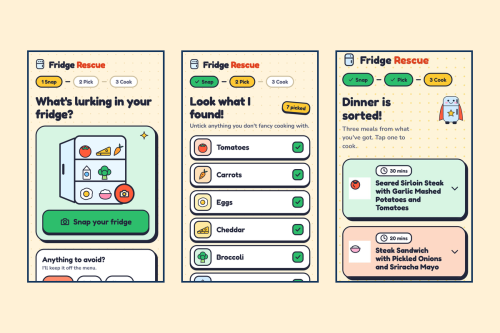
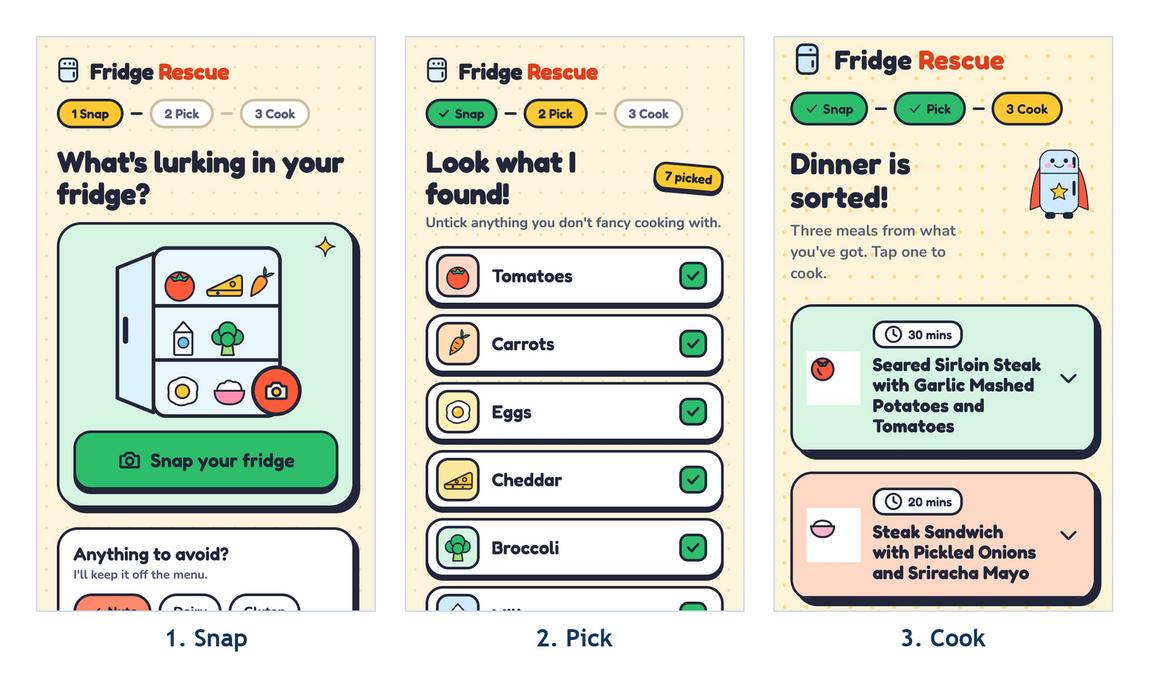
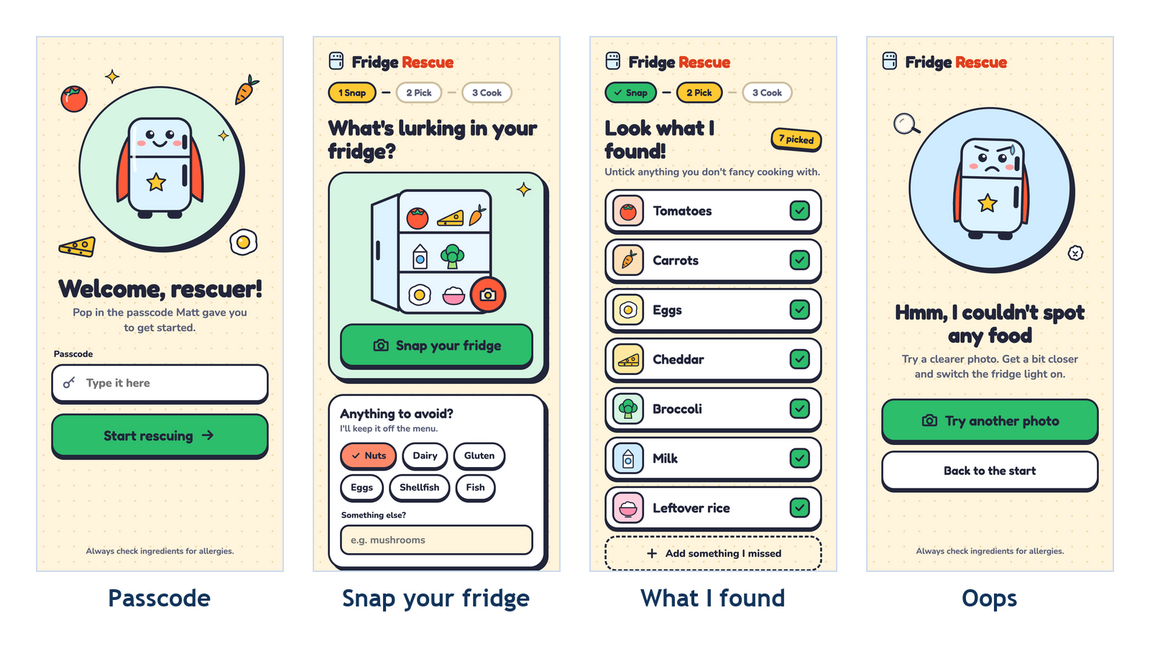
It works in three steps, and the app's own progress bar shows them as Snap, Pick and Cook.
- 1. Snap You take a photo of what's in your fridge. (You won't be seeing a photo of mine. Some things are private.)
- 2. Pick It tells you what it spotted, with a little picture for each. Untick anything you don't fancy cooking with, add anything it missed, and tell it what to avoid, like nuts or dairy.
- 3. Cook You get three meal ideas made from what you've actually got, each with the ingredients and step by step instructions to turn a random bag of bits into dinner. It even flags what to use up first before it goes off.
That's it. No trawling through recipe sites, and with luck, less food in the bin. It's useful, it's a bit daft, and it's exactly the sort of thing a friend might actually use.
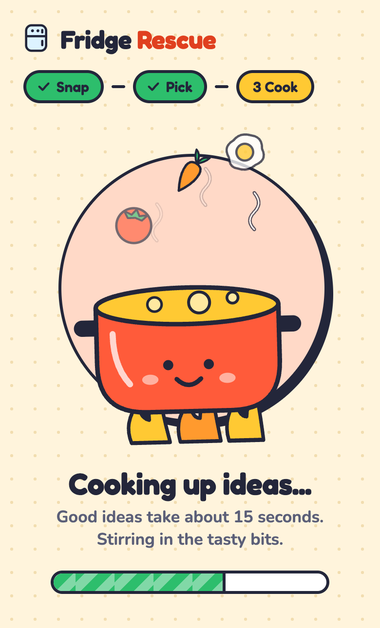
Three hours, and most of them were one error
The first version was built in an AI app builder. The actual build took somewhere between 45 minutes and an hour. If that had been the whole story, this would be a very short blog.
Then the app needed a key. That's a sort of password that lets it talk to Google's AI (Gemini). And the builder kept handing me an error about the format of that key. Some of the documentation I found was out of date, so I kept following instructions that didn't match what I was seeing.
Two tools that should have been chatting away happily, and weren't. Nobody's fault, as far as I can tell. A bit of documentation hadn't caught up. Every round it told me it had cracked it, and every round the same error came back.

This is where the old adage of short and meaningful feedback loops really earns its crust. For most of that time I was in a loop that gave me nothing useful back. A fresh pair of eyes gave me the answer in the time it takes to make a sandwich.
So that's idea to a first working version in about three hours. I put it on Netlify, sent a link to family and friends, and it worked.
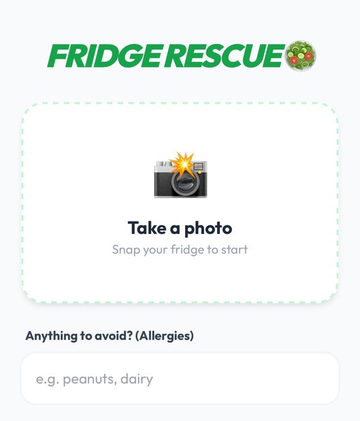
Version one. It worked. It also looked like it got dressed in the dark. Green italic heading, a camera emoji, plain white boxes. It did the job.
So why not leave it alone?
Three reasons.
I wanted it to be properly shareable, not just a quick experiment. I wanted it to look polished and fun as well as work. And I wanted it to be robust enough that I wasn't crossing my fingers every time someone used it.
Okay, there was a fourth reason. I'd watched Claude get a lot more capable over the past month or so, and I wanted to find out what happens when you stop treating AI as a clever chat window and start treating it as a team.
The kitchen brigade
The setup I used came from my friend, former colleague and collaborator Matt Odell. He gave me the starting layout, and I've tweaked it to suit how I work. A good chunk of it comes from the Kanban Maturity Model: work you can see, rules written down where everyone can read them, limits on how much we take on, and quick feedback. I teach it. This was my chance to eat my own cooking.
A restaurant kitchen works like this. Nobody does everything. Everybody has a job, and nothing leaves the kitchen without passing a few sets of eyes.
Bob, Baz and the rest are all Claude underneath, each given a different job, different rules and different access.
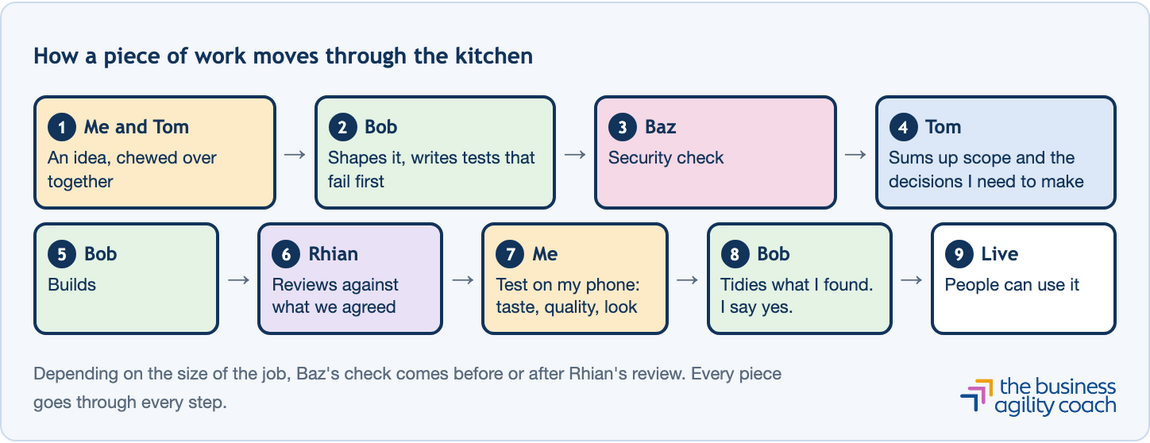
Tom (runs the pass). Every idea starts as a chat between me and Tom. Tom keeps the whole picture, checks the scope makes sense, and tells me which decisions are mine to make.
Bob (the cook). Turns the idea into a clear piece of work and writes the tests first. Those are checks that describe what "done" looks like, and they fail until the thing is built properly. Then Bob builds it.
Baz (the environmental health inspector). Blunt, and not here to make friends. Baz checks anything that touches security before it goes near real people.
Rhian (the second pair of eyes). Reviews what Bob built against what we agreed, in a fresh session that never saw the building. It's the closest an AI gets to fresh eyes. Depending on the size of the job, Baz looks before Rhian or after.
Clem (not in the kitchen). Looks after my marketing and bounces ideas around with me.
Me (the one who tastes it). I test every change on my phone and judge it on taste, quality and how it looks.
Depending on the size of the job, Baz's check comes before or after Rhian's review. Every piece goes through every step.
Seeing the work
Here's the bit I'd have been lost without: the board.
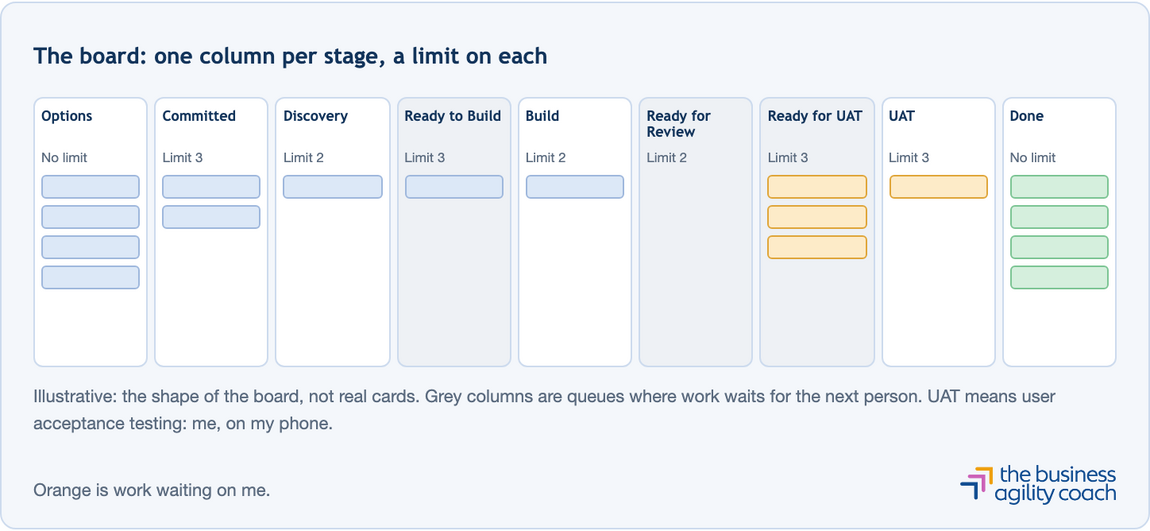
Every piece of work lives on one Kanban board. It's one shared board on GitHub, used for all my builds. Each column is a stage, and a piece of work moves from left to right, one column at a time. If you've ever been in one of my workshops, you'll know I can't help myself.
Three things make the board worth having.
I can see where we are. At a glance: what's being planned, what's being built, what's with the reviewer, and what's waiting for me.
I can see where things get stuck. Every column has a limit on how much can sit in it at once. (WIP limits, if you're a Kanban person. Only so many plates on the pass at once, if you're not.) GitHub doesn't enforce them, so the agents count before they pull anything new and stop at the limit. If a piece of work is blocked, it carries a label and a note saying what's needed and from whom. Tom's daily brief lists what's waiting on me, what's blocked and what's ageing.
We measure it. Fourteen days in one column counts as ageing, which is our early warning. If something comes back from review, it's fixed where it sits and tagged, so the board tells the truth about how much rework there is. Every so often we run a proper flow review: how long things take, where they wait, and whether the limits are right.
What the rules actually do
Rules sound dull until they save you.
When we added a box where you can type in something the photo missed, the first question wasn't how it should look. It was what happens if someone types something daft or nasty into it. So the text gets cleaned and checked before it goes anywhere: letters only, a sensible length, no more than 20 items, and nothing is saved afterwards. That's the security check doing its job before the box ever reached my phone.
Testing works the same way. Because the tests are written first, "done" means a list we can tick off. And the key to Google's AI is kept in the back office, not left on the counter, so nobody can pick it up by poking around.
What we actually changed
The big one was the look. We called it Sticker Kitchen: a cream background, chunky outlines, hard little shadows, hand-drawn food icons, and a caped fridge mascot. All seven screens got the same treatment. The buttons grew to a thumb-friendly size. The ugly browser pop-ups were swapped for friendlier screens. If the app can't spot anything, you get an "Oops" screen with a button to try another photo instead of a shrug.
We added that "something I missed" box. And we moved the whole thing from Netlify to Cloudflare, which is a good example of a trade-off.
Netlify (where the app was living online) only lets one person work on a private project on its free plan. Every time Bob opened a piece of work for review, the preview fell over. The fix was $20 a month, for a free app for my family. Or we move. We moved. It took one piece of work, and the family app stays free.
Where I got stuck
I'd love to say it was plain sailing. It wasn't. It was mega wiggly.
The rules sometimes felt too tight. Some of the suggestions to lock things down went further than I wanted to go. They were correct by the rules we'd written. The rules were what I'd set too tight, so I'd turned the safety dial up a notch too far and we had some back and forth.
It needed a lot of me. There were loads of handoffs between agents, and many of them needed my decision. I'm still working out how to make that smoother, and every handoff added time.
Claude assumed I knew things. Sometimes it would ask me to do something that assumed a skill I didn't have yet. So I'd slow it right down and ask it to take me through step by step, which is a much better way to learn anyway.
I said no to the App Store. Claude walked me through how we'd do it. The legwork was way too much faff. I wanted something friends and family could use, and to prove I could. An App Store listing was never on the menu.
What I'd tell you to do
Shape your agents first. Don't rush to the build. Give each agent a clear role and the right level of access, then work with them and improve them as you go. The time you spend up front pays you back.
Keep the feedback loops fast. (See: that error message.)
Know that you'll be the bottleneck. Agents move fast, so you become the queue, up front and at review. I kept all the end-user testing for myself, because I wanted to see what we'd made on my own phone. That made me the bottleneck, and I spend my working life telling people to find their constraint. And the constraint? Me...... So make sure you've got the time to test at the speed you want to release.
Taste is still mine. The agents write the code, run the tests and check each other's work, all very quickly. But the ideas, and whether the thing looks and feels right, still sit with me. That might change over time.
Right now, agents can cook all day, and someone still has to taste the food before it goes out of the kitchen.
So how did it land?
Different reactions, all of them good.
Some people were shocked. They know me, and they know hands-on coding isn't something I do. The reaction I heard most was surprise that I could do this. The other was how good it looks.
People who'd used the first version were really positive about the redesign, especially the visuals. Friends who never saw version one loved it too. A few friends of friends asked for the link, and because I know them, I was happy to hand it over.
That's the bit I'm proudest of. I didn't write a line of the code. What I did bring was the idea, the taste and the judgement, and we ended up with something people genuinely like using.
If you want to chat about any of this, I'm on LinkedIn, or you can drop me a message through the Get In Touch page.